i18n - 크라우드인 사용하기
The i18n system of Docusaurus is decoupled from any translation software.
You can integrate Docusaurus with the tools and SaaS of your choice, as long as you put the translation files at the correct location.
We document the usage of Crowdin, as one possible integration example.
This is not an endorsement of Crowdin as the unique choice to translate a Docusaurus site, but it is successfully used by Facebook to translate documentation projects such as Jest, Docusaurus, and ReasonML.
Refer to the Crowdin documentation and Crowdin support for help.
Use this community-driven GitHub discussion to discuss anything related to Docusaurus + Crowdin.
크라우드인 개요
Crowdin is a translation SaaS, offering a free plan for open-source projects.
아래와 같은 순서로 번역을 진행하는 것을 권장합니다.
- Upload sources to Crowdin (untranslated files)
- Use Crowdin to translate the content
- Download translations from Crowdin (localized translation files)
Crowdin provides a CLI to upload sources and download translations, allowing you to automate the translation process.
The crowdin.yml configuration file is convenient for Docusaurus, and permits to download the localized translation files at the expected location (in i18n/[locale]/..).
Read the official documentation to know more about advanced features and different translation workflows.
크라우드인 따라해보기
This is a walk-through of using Crowdin to translate a newly initialized English Docusaurus website into French, and assume you already followed the i18n tutorial.
The end result can be seen at docusaurus-crowdin-example.netlify.app (repository).
도큐사우루스 사이트 준비하기
새로운 도큐사우루스 사이트를 초기화합니다.
npx create-docusaurus@latest website classic
프랑스어 번역을 위해 site 설정을 아래와 같이 추가합니다.
export default {
  i18n: {
    defaultLocale: 'en',
    locales: ['en', 'fr'],
  },
  themeConfig: {
    navbar: {
      items: [
        // ...
        {
          type: 'localeDropdown',
          position: 'left',
        },
        // ...
      ],
    },
  },
  // ...
};
홈페이지를 번역합니다.
import React from 'react';
import Translate from '@docusaurus/Translate';
import Layout from '@theme/Layout';

export default function Home() {
  return (
    <Layout>
      <h1 style={{margin: 20}}>
        <Translate description="The homepage main heading">
          Welcome to my Docusaurus translated site!
        </Translate>
      </h1>
    </Layout>
  );
}
크라우드인 프로젝트 만들기
Sign up on Crowdin, and create a project.
소스 언어로 영어를 설정하고 대상 언어로 프랑스어를 설정합니다.
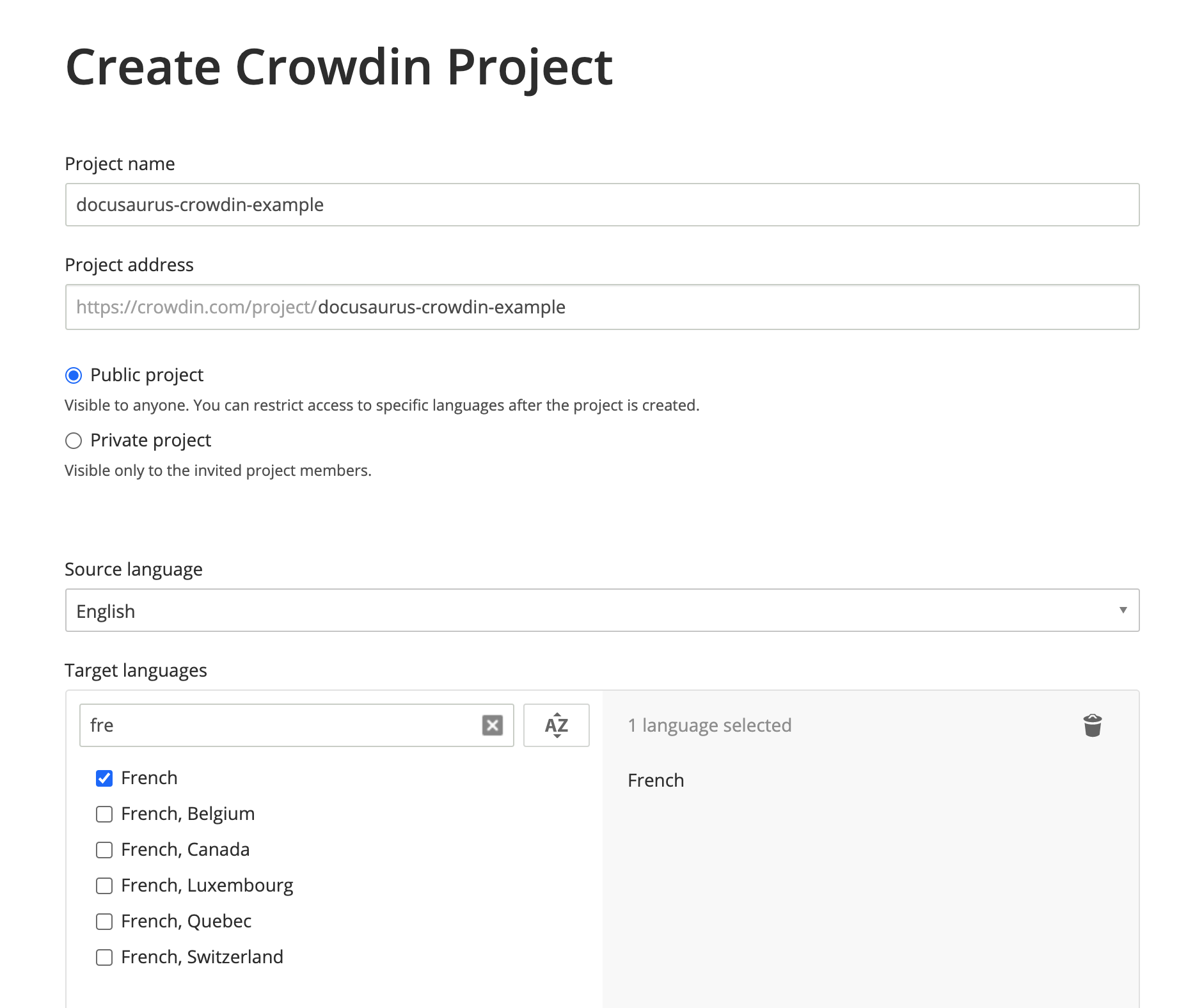
프로젝트가 만들어졌지만 아직은 아무것도 없습니다. 다음 단계에서 번역할 파일을 업로드할 겁니다.
크라우드인 설정 만들기
이 설정(문서)은 Crowdin CLI가 다음 내용을 파악할 수 있도록 매핑을 제공합니다:
- 업로드할 소스 파일(JSON, 마크다운)을 어디서 찾아야 하는지
- 번역 후 파일을 다운로드할 위치(
i18n/[locale])
website에 crowdin.yml을 만드세요:
project_id: '123456'
api_token_env: CROWDIN_PERSONAL_TOKEN
preserve_hierarchy: true
files:
  # JSON 번역 파일
  - source: /i18n/en/**/*
    translation: /i18n/%two_letters_code%/**/%original_file_name%
  # 문서 마크다운 파일
  - source: /docs/**/*
    translation: /i18n/%two_letters_code%/docusaurus-plugin-content-docs/current/**/%original_file_name%
  # 블로그 마크다운 파일
  - source: /blog/**/*
    translation: /i18n/%two_letters_code%/docusaurus-plugin-content-blog/**/%original_file_name%
크라우드인은 소스/번역 파일의 경로를 설정하는 자체 구문을 가지고 있습니다.
**/*: 하위 폴더의 모든 항목%two_letters_code%: Crowdin 대상 언어의 2글자 코드(이 예제에서는fr)**/%original_file_name%: 번역에서 원래 폴더/파일 계층을 유지합니다
크라우드인 명령행 도구에서 보여지는 경고 메시지 일부는 이해하기 어려울 수 있습니다.
그래서 아래와 같이 작업할 것을 권장합니다.
- 한 번에 하나 씩만 변경하기
- 설정을 변경했다면 소스를 다시 업로드하기
/로 시작하는 경로를 사용하세요(./는 동작하지 않습니다)/docs/**/*.(md|mdx)같은 복잡한 글로브 패턴은 피하세요(동작하지 않습니다)
토큰 접근하기
api_token_env 속성은 Crowdin CLI가 읽을 환경 변수의 이름을 정의합니다.
개인 프로필 페이지에서 개인 액세스 토큰을 발급받을 수 있습니다.
기본값인 CROWDIN_PERSONAL_TOKEN을 유지하고, 컴퓨터와 CI 서버에서 이 환경 변수의 값을 생성된 액세스 토큰으로 설정하면 됩니다.
개인 액세스 토큰은 모든 Crowdin 프로젝트에 대한 읽기/쓰기 권한을 부여합니다.
토큰은 커밋하면 안 됩니다. 개인 계정 대신 회사 전용 Crowdin 프로필을 만드는 것도 좋은 방법입니다.
추가로 설정해야 하는 값
project_id: 하드코딩할 수 있으며https://crowdin.com/project/\<MY_PROJECT_NAME>/settings#api에서 확인할 수 있습니다preserve_hierarchy: Crowdin UI에서 문서 폴더 구조를 평탄화하지 않고 계층을 유지합니다
크라우드인 명령행 도구 설치하기
This tutorial uses the CLI version 3.5.2, but we expect 3.x releases to keep working.
여러분의 도큐사우루스 사이트에 npm 패키지로 크라우드인 명령행 도구를 설치합니다.
- npm
- Yarn
- pnpm
- Bun
npm install @crowdin/cli@3
yarn add @crowdin/cli@3
pnpm add @crowdin/cli@3
bun add @crowdin/cli@3
crowdin 스크립트를 추가하세요:
{
  "scripts": {
    // ...
    "write-translations": "docusaurus write-translations",
    "crowdin": "crowdin"
  }
}
크라우드인 명령행 도구가 정상적으로 설치됐는지 확인합니다.
- npm
- Yarn
- pnpm
- Bun
npm run crowdin -- --version
yarn crowdin --version
pnpm run crowdin --version
bun run crowdin --version
CLI가 Crowdin API에 인증할 수 있도록 컴퓨터에서 CROWDIN_PERSONAL_TOKEN 환경 변수를 설정하세요.
임시로 crowdin.yml에 api_token: 'MY-TOKEN' 형식으로 개인 토큰을 하드코딩할 수도 있습니다.
소스 업로드하기
기본 언어의 JSON 번역 파일을 website/i18n/en에 생성하세요:
- npm
- Yarn
- pnpm
- Bun
npm run write-translations
yarn write-translations
pnpm run write-translations
bun run write-translations
JSON, 마크다운 번역 파일을 업로드합니다.
- npm
- Yarn
- pnpm
- Bun
npm run crowdin upload
yarn crowdin upload
pnpm run crowdin upload
bun run crowdin upload
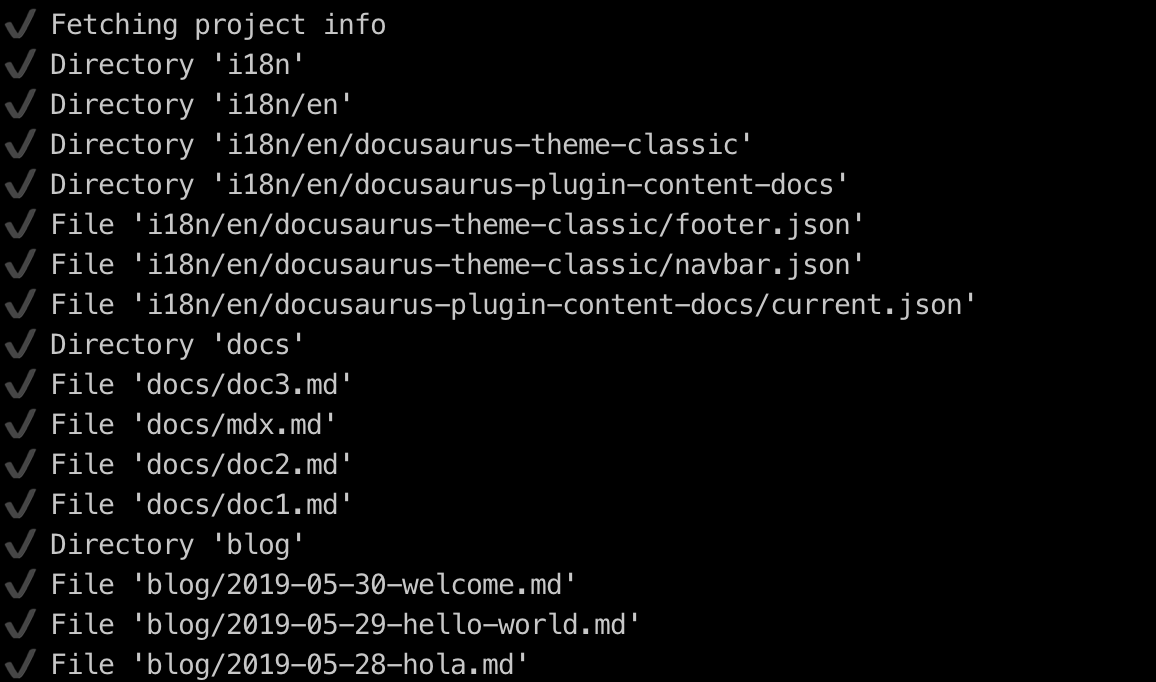
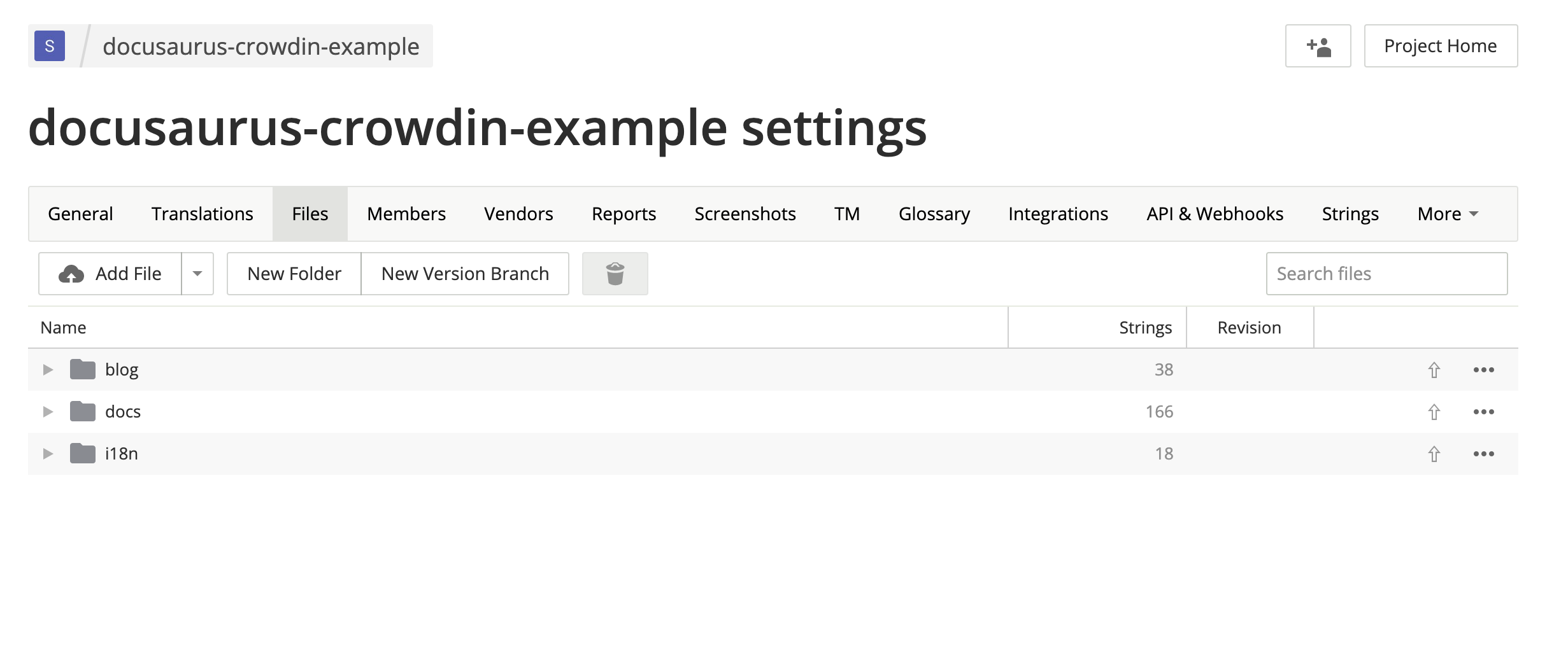
이제 Crowdin 인터페이스에서 원본 파일을 볼 수 있습니다: https://crowdin.com/project/\<MY_PROJECT_NAME>/settings#files
소스 번역하기
https://crowdin.com/project/\<MY_PROJECT_NAME>에서 대상 언어인 프랑스어를 클릭하세요.
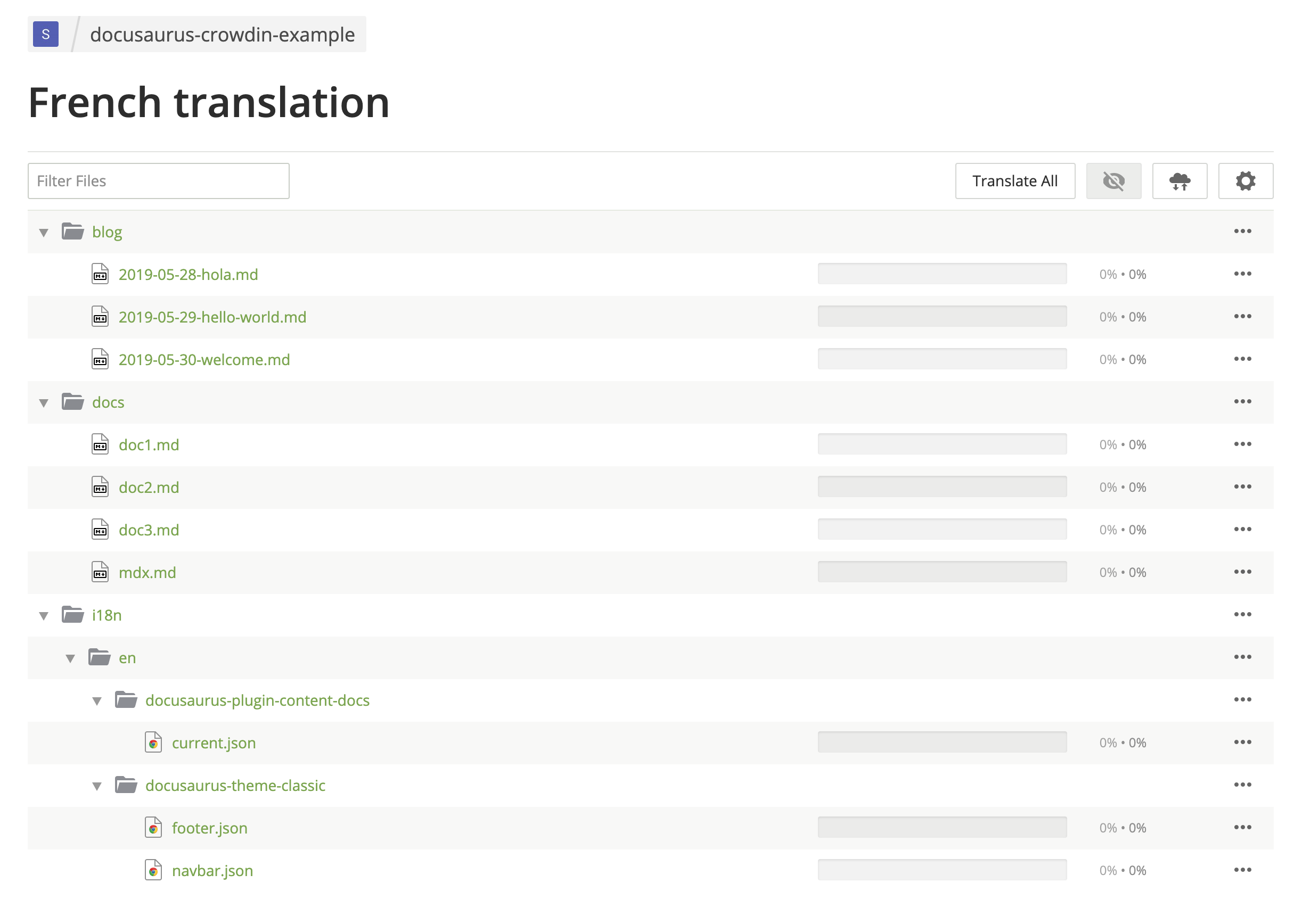
마크다운 파일을 번역합니다.
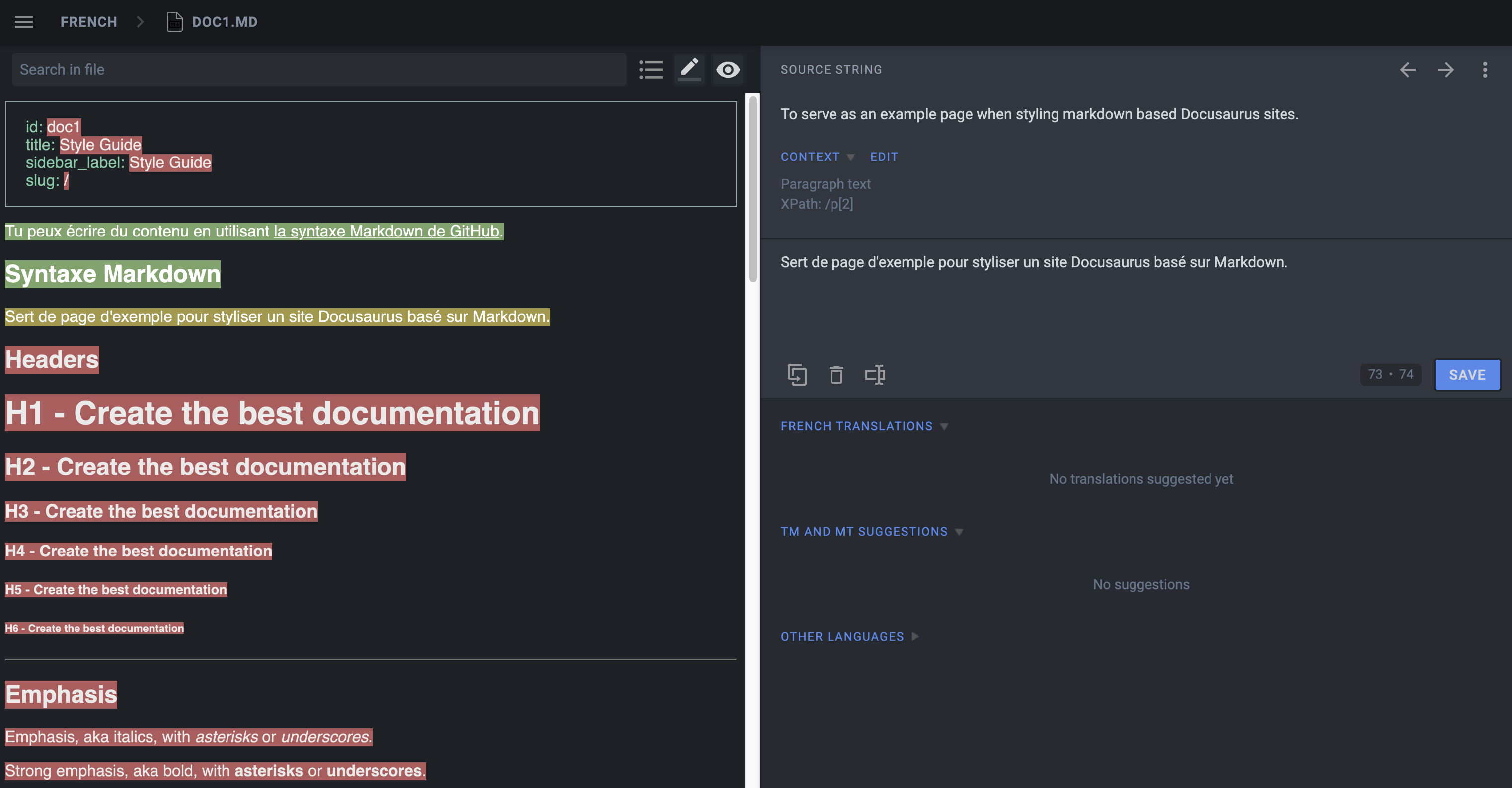
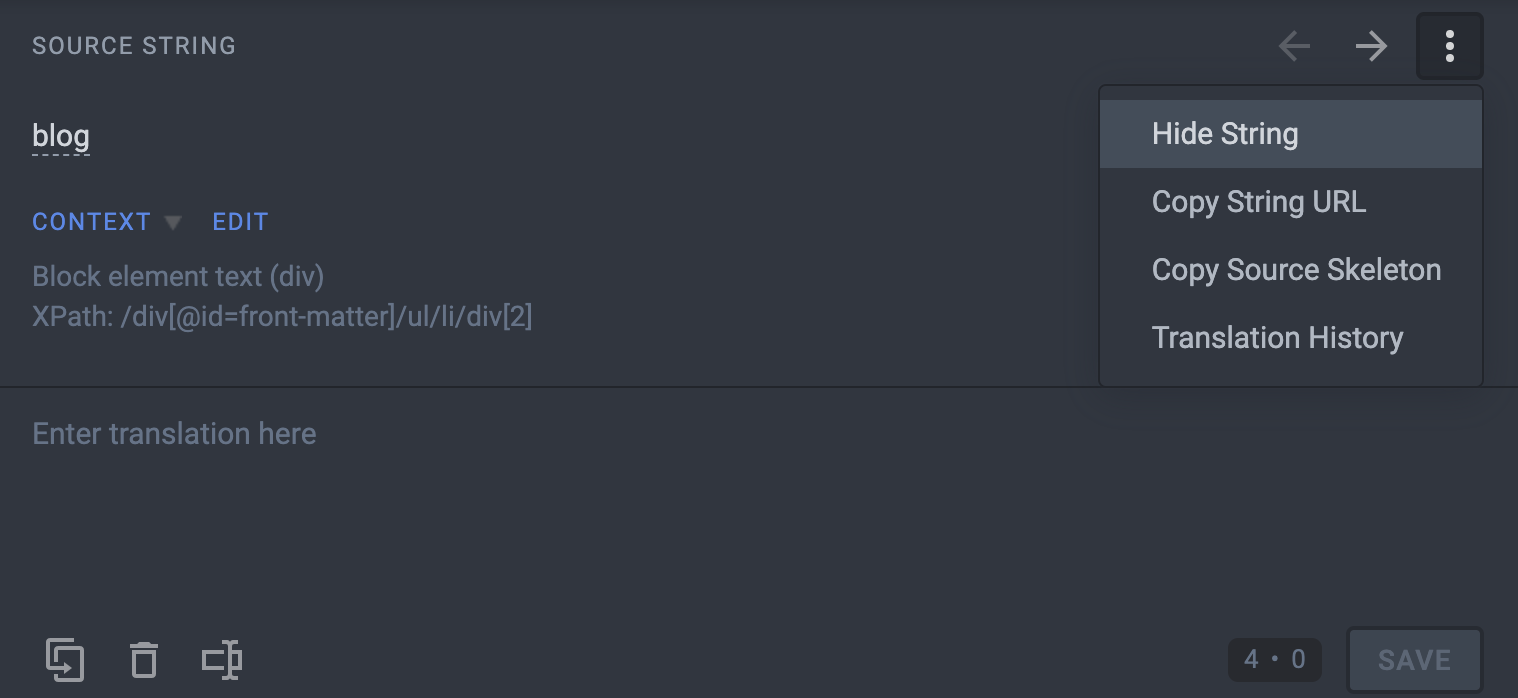
Hide String을 사용해 번역자가 번역하면 안 되는 항목을 번역하지 않도록 하세요:
- 프런트 매터:
id,slug,tags... - 어드모니션:
:::,:::note,:::tip...
JSON 파일을 번역합니다.
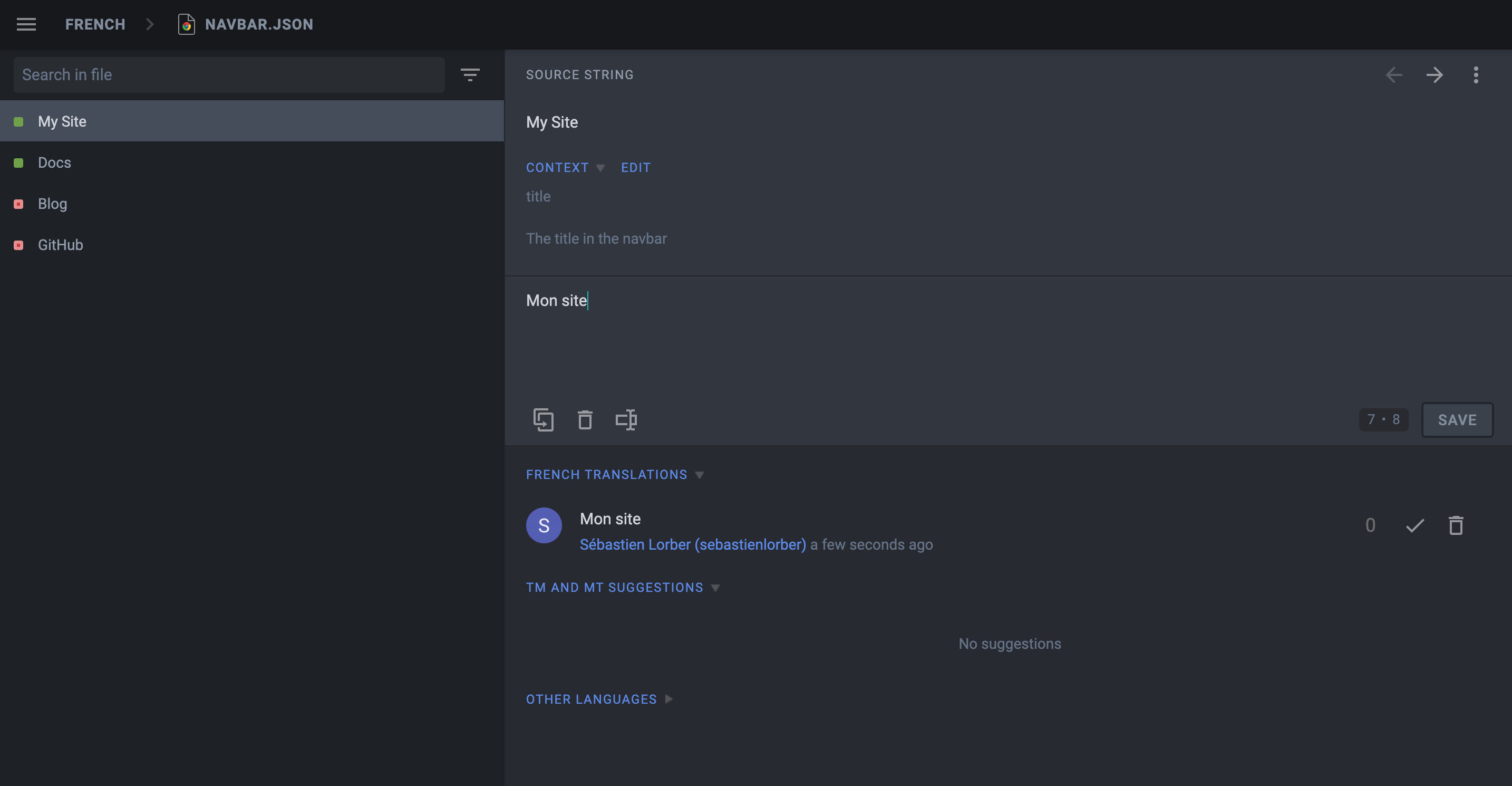
JSON 번역 파일의 description 속성은 문자열 번역에 도움이 되도록 Crowdin에 표시됩니다.
사이트를 **사전 번역**한 후 사전 번역의 오류를 직접 수정하세요(먼저 설정에서 전역 번역 메모리를 활성화하세요).
Crowdin은 번역하지 않아야 하는 항목까지 사전 번역하는 경향이 있으므로 먼저 Hide String 기능을 사용하세요.
번역 다운로드하기
번역한 JSON, 마크다운 파일을 크라우드인 명령행 도구를 사용해 내려받습니다.
- npm
- Yarn
- pnpm
- Bun
npm run crowdin download
yarn crowdin download
pnpm run crowdin download
bun run crowdin download
번역된 콘텐츠는 i18n/fr에 다운로드되어야 합니다.
이제 프랑스어 사이트를 시작해봅니다.
- npm
- Yarn
- pnpm
- Bun
npm run start -- --locale fr
yarn run start --locale fr
pnpm run start --locale fr
bun run start --locale fr
이제 http://localhost:3000/fr/에서 웹사이트가 프랑스어로 번역되었는지 확인하세요.
CI로 자동화하기
CI가 빌드 시 Crowdin 번역을 다운로드하고 Git에는 저장하지 않도록 설정하겠습니다.
.gitignore에 website/i18n을 추가하세요.
CI에서 CROWDIN_PERSONAL_TOKEN 환경 변수를 설정하세요.
Crowdin을 sync하는 npm 스크립트(원본 추출, 원본 업로드, 번역 다운로드)를 만드세요:
{
  "scripts": {
    "crowdin:sync": "docusaurus write-translations && crowdin upload && crowdin download"
  }
}
CI에서 도큐사우루스 사이트를 빌드하기 직전에 npm run crowdin:sync 스크립트를 호출하세요.
배포 미리보기의 속도를 유지하세요. 번역을 다운로드하지 말고 기능 브랜치에서는 npm run build -- --locale en을 사용하세요.
크라우드인은 동시에 여러 버전을 업로드하거나 내려받는 것을 지원하지 않습니다. 번역은 운영 배포에만 포함하고 배포 미리보기는 번역하지 않는 상태로 유지하는 것을 권장합니다.
크라우드인 좀 더 살펴보기
MDX
MDX 문서를 다룰 때는 문서 내 JSX 조각을 주의해주세요.
Crowdin은 MDX를 공식 지원하지는 않지만, .mdx 확장자 지원을 추가하여 해당 파일을 일반 텍스트가 아닌 마크다운으로 해석합니다.
MDX 파일 사용 시 문제점
크라우드인에서 JSX 구문을 HTML으로 인식해서 번역 파일을 내려받을 때 JSX 마크업이 훼손될 수 있습니다. 이로 인해 잘못된 JSX 구문으로 빌드 실패의 원인이 됩니다.
<Username name="Sebastien"/>처럼 단순한 문자열 props를 사용하는 JSX 조각은 잘 동작합니다. 하지만 <User person={{name: "Sebastien"}}/>처럼 객체/배열 props를 사용하는 복잡한 JSX 조각은 구문이 HTML과 다르므로 실패할 가능성이 더 높습니다.
MDX 파일 사용 시 우회 방안
복잡한 JSX 코드는 별도로 독립적인 컴포넌트로 추출하는 것을 권장합니다. 또한 우회 방법으로 mdx-code-block 구문을 추가했습니다:
# 도큐사우루스 배포 방법

도큐사우루스를 배포하려면 다음 명령을 실행하세요:

````mdx-code-block

import Tabs from '@theme/Tabs';

import TabItem from '@theme/TabItem';

<Tabs>
  <TabItem value="bash" label="Bash">

  ```bash
  GIT_USER=<GITHUB_USERNAME> yarn deploy
  ```

  </TabItem>
  <TabItem value="windows" label="Windows">

  ```batch
  cmd /C "set "GIT_USER=<GITHUB_USERNAME>" && yarn deploy"
  ```

  </TabItem>
</Tabs>
````
이렇게 하면
- 크라우드인에서는 코드 블럭으로 처리합니다(파일을 내려받을 때 마크업 코드를 훼손하지 않습니다).
- 도큐사우루스에서는 일반적인 JSX 코드로 처리합니다(다른 코드 블럭과 다르게).
- 아쉽지만 MDX 도구(IDE 구문 강조, 코드 정렬 같은)는 적용할 수 없습니다.
문서 버전에 따른 번역 작업
Configure translation files for the website/versioned_docs folder.
When creating a new version, the source strings will generally be quite similar to the current version (website/docs), and you don't want to translate the new version docs again and again.
Crowdin provides a Duplicate Strings setting.
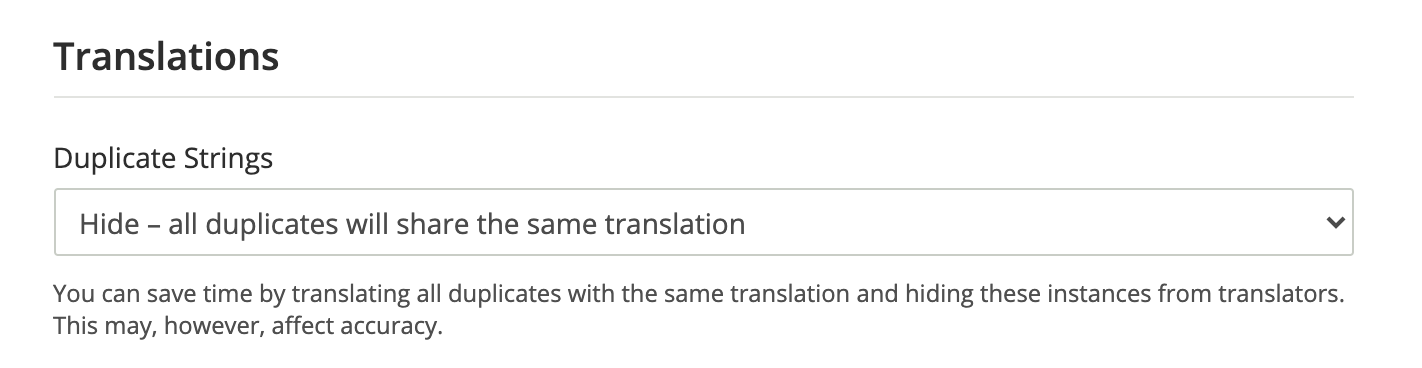
We recommend using Hide, but the ideal setting depends on how much your versions are different.
Not using Hide leads to a much larger amount of source strings in quotas, and will affect the pricing.
멀티 인스턴스 플러그인
각 플러그인 인스턴스에 대한 번역 작업이 필요할 수 있습니다.
If you have a docs plugin instance with id=ios, you will need to configure those source files as well
website/ioswebsite/ios_versioned_docs(if versioned)
사이트 관리하기
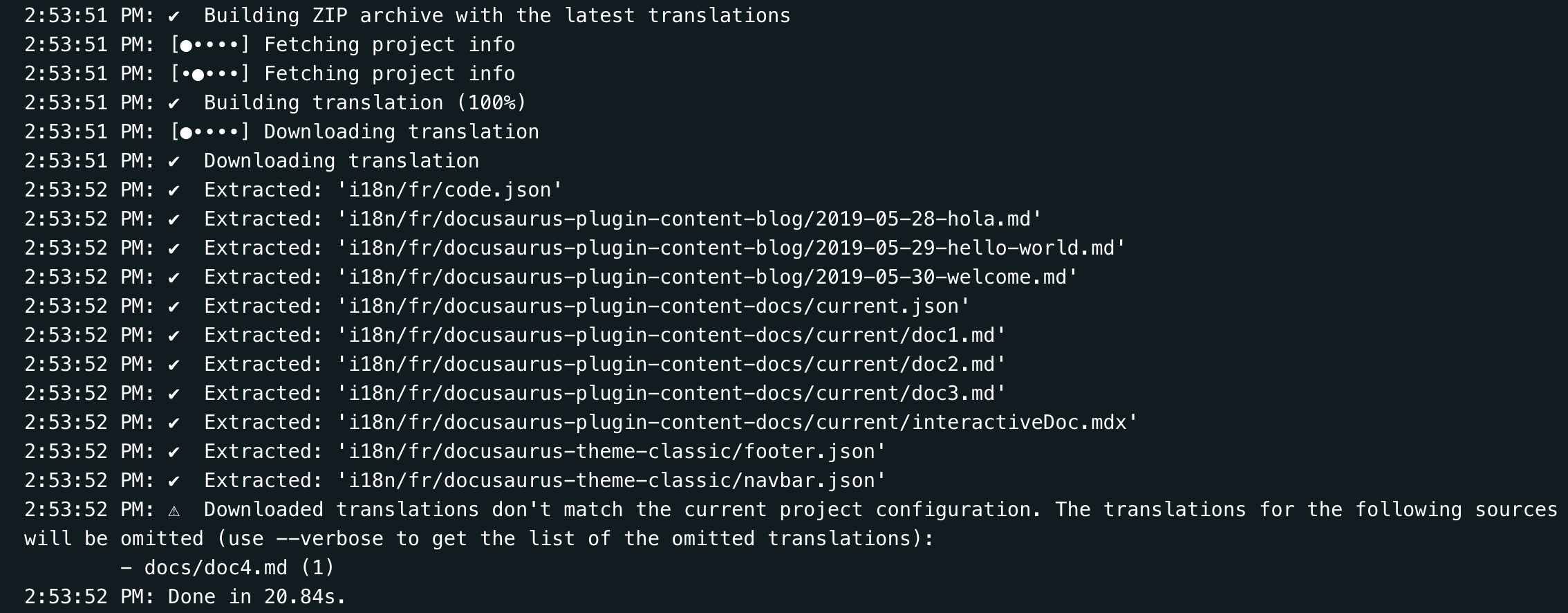
Sometimes, you will remove or rename a source file on Git, and Crowdin will display CLI warnings:
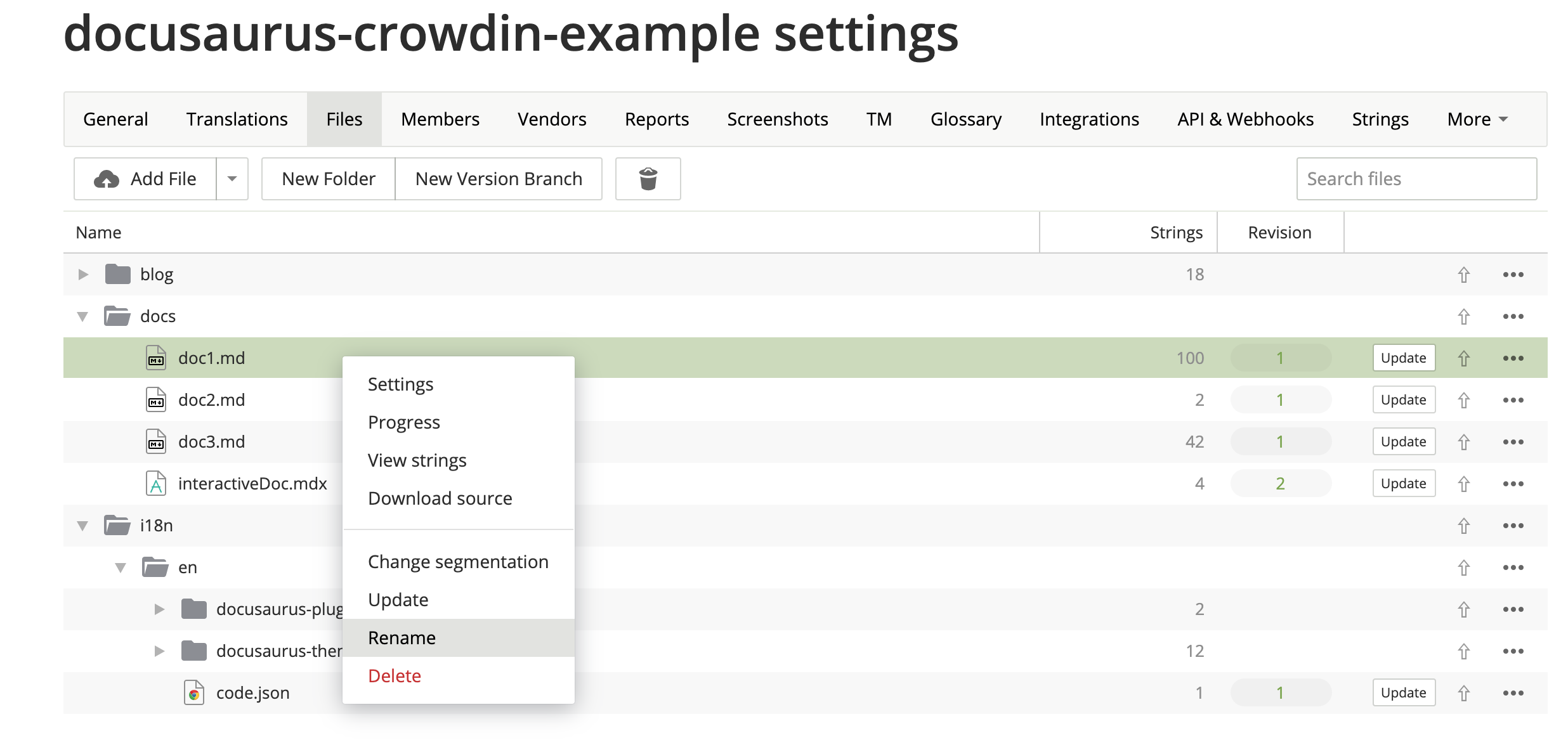
When your sources are refactored, you should use the Crowdin UI to update your Crowdin files manually:
버전 관리 시스템(깃) 통합하기
Crowdin has multiple VCS integrations for GitHub, GitLab, Bitbucket.
하지만 이렇게 사용하는 건 권장하지 않습니다.
It could have been helpful to be able to edit the translations in both Git and Crowdin, and have a bi-directional sync between the 2 systems.
In practice, it didn't work very reliably for a few reasons:
- The Crowdin -> Git sync works fine (with a pull request)
- The Git -> Crowdin sync is manual (you have to press a button)
- 크라우드인에서 기존 마크다운 번역을 마크다운 소스와 연결하기 위해 사용하는 접근법은 100% 신뢰할 수는 없습니다. 깃과 동기화 작업 후에 크라우드인 UI에서 결과를 직접 검토해주어야 합니다.
- 2명의 번역자가 깃과 크라우드인에서 동시에 작업하는 경우에는 번역 작업 간 충돌이 생길 수 있습니다.
- It requires the
crowdin.ymlfile to be at the root of the repository
In-Context 번역
Crowdin has an In-Context localization feature.
아쉽게도 기술적인 이유로 잘 동작하지 않습니다. 나중에라도 문제가 해결되기를 바랍니다.
Crowdin replaces Markdown strings with technical IDs such as crowdin:id12345, but it does so too aggressively, including hidden strings, and messes up with front matter, admonitions, JSX...
번역한 화면 URL 편집하기
When the user is browsing a page at /fr/doc1, the edit button will link by default to the unlocalized doc at website/docs/doc1.md.
You may prefer the edit button to link to the Crowdin interface instead by using the editUrl function to customize the edit URLs on a per-locale basis.
const DefaultLocale = 'en';

export default {
  presets: [
    [
      '@docusaurus/preset-classic',
      {
        docs: {
          editUrl: ({locale, versionDocsDirPath, docPath}) => {
            // Link to Crowdin for French docs
            if (locale !== DefaultLocale) {
              return `https://crowdin.com/project/docusaurus-v2/${locale}`;
            }
            // Link to GitHub for English docs
            return `https://github.com/facebook/docusaurus/edit/main/website/${versionDocsDirPath}/${docPath}`;
          },
        },
        blog: {
          editUrl: ({locale, blogDirPath, blogPath}) => {
            if (locale !== DefaultLocale) {
              return `https://crowdin.com/project/docusaurus-v2/${locale}`;
            }
            return `https://github.com/facebook/docusaurus/edit/main/website/${blogDirPath}/${blogPath}`;
          },
        },
      },
    ],
  ],
};
It is currently not possible to link to a specific file in Crowdin.
설정 예시
The Docusaurus configuration file is a good example of using versioning and multi-instance:
project_id: '428890'
api_token_env: CROWDIN_PERSONAL_TOKEN
preserve_hierarchy: true
languages_mapping: &languages_mapping
  two_letters_code:
    pt-BR: pt-BR
mdx_file_type: &mdx_file_type mdx_v2_4
files:
  - source: /website/i18n/en/**/*
    translation: /website/i18n/%two_letters_code%/**/%original_file_name%
    languages_mapping: *languages_mapping
  - source: /website/docs/**/*.mdx
    translation: /website/i18n/%two_letters_code%/docusaurus-plugin-content-docs/current/**/%original_file_name%
    languages_mapping: *languages_mapping
    type: *mdx_file_type
  - source: /website/docs/**/*
    translation: /website/i18n/%two_letters_code%/docusaurus-plugin-content-docs/current/**/%original_file_name%
    languages_mapping: *languages_mapping
    ignore: [/**/*.mdx]
  - source: /website/versioned_docs/**/*.mdx
    translation: /website/i18n/%two_letters_code%/docusaurus-plugin-content-docs/**/%original_file_name%
    languages_mapping: *languages_mapping
    type: *mdx_file_type
  - source: /website/versioned_docs/**/*
    translation: /website/i18n/%two_letters_code%/docusaurus-plugin-content-docs/**/%original_file_name%
    languages_mapping: *languages_mapping
    ignore: [/**/*.mdx]
  - source: /website/community/**/*
    translation: /website/i18n/%two_letters_code%/docusaurus-plugin-content-docs-community/current/**/%original_file_name%
    languages_mapping: *languages_mapping
  - source: /website/blog/**/*
    translation: /website/i18n/%two_letters_code%/docusaurus-plugin-content-blog/**/%original_file_name%
    languages_mapping: *languages_mapping
  - source: /website/src/pages/**/*
    translation: /website/i18n/%two_letters_code%/docusaurus-plugin-content-pages/**/%original_file_name%
    ignore: [/**/*.js, /**/*.jsx, /**/*.ts, /**/*.tsx, /**/*.css]
    languages_mapping: *languages_mapping
기계 번역(MT) 문제: 링크/이미지 처리
크라우드인(Crowdin)은 최근 마크다운 파일 형식에 대한 몇 가지 주요 변경 사항을 출시했으며 이제 링크가 이전과 다르게 처리됩니다. 이전에는 태그로 간주되었지만 이제는 일반 텍스트로 표시됩니다. Because of these changes the plain text links are passed to the MT engine which attempts to translate the target, thus breaking the translation (for instance: this string Allez voir [ma merveilleuse page](/ma-merveilleuse-page) is translated Check out [my wonderful page](/my-wonderful-page), and this breaks docusaurus i18n workflow as the page name should not be translated).
2023년 12월 7일 현재 링크 처리 방식의 논리를 변경할 계획이 없으므로 MT와 함께 Crowdin을 사용할 계획이라면 이 점을 염두에 두어야 합니다.